A scanner in your pocket, a PDF in seconds.
Our document products turn a phone into a portable scanner. Capture paper documents with automatic edge detection, recognise the text, sign, organise and share them as clean PDFs.
What it does
Document scanning, OCR and PDF tools, designed and produced by Nexavo International Group.
Automatic capture
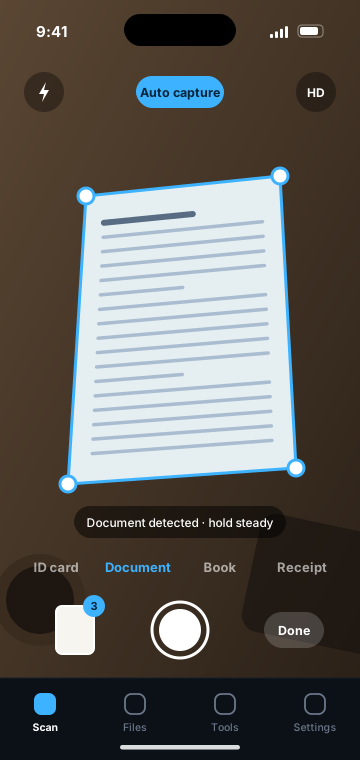
Edges are detected and the page is captured, cropped and straightened.
Clean-up filters
Removes shadows and boosts contrast for print-quality pages.
Text recognition (OCR)
Makes scans searchable and lets text be copied out.
Sign and annotate
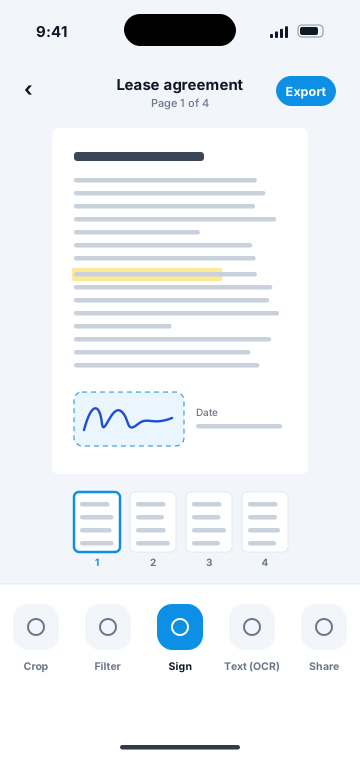
Add a signature, date, highlight or note directly on the page.
PDF tools
Merge, split, reorder and compress, or export as images.
Folders and search
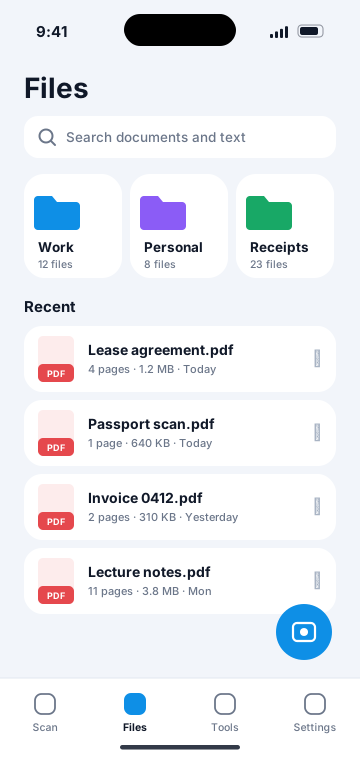
Organise by folder and find a document by the words inside it.
Three steps, no manual.
Scan
Point the camera at a document, ID card, book or receipt.
Edit
Adjust the crop, apply a filter, add a signature.
Export
Save as PDF and share by email, cloud or print.
Frequently asked
How many pages can a document have?
Multi-page scanning is supported, with pages added in batch and reordered afterwards.
Which languages does OCR support?
Most widely used languages written in Latin, Cyrillic and major Asian scripts.
Are documents uploaded?
Scans are stored on the device unless a cloud or sync feature is switched on.
Other product lines
Let’s talk about what we can build together.
Partnerships, press, licensing or a question about one of our products — we read every message.